Beyond the Agent Demo: Six Controls for Trustworthy AI Tool Calling
A live AI-agent experiment exposed invented tool arguments, approval bottlenecks, and missing traces. Here are six application-owned controls for safer, testable tool execution.
When validation is not enough
The JSON was valid. The schema accepted it. The tool executed. Two surprises stood out: the user had never supplied the value, and human approval dominated the runtime. Three more problems turned up in the live runs, listed below.
In the first live trace, the model called get_training_plan with "athlete": "Unknown". The user had never given a name. The value was well formed, passed the schema, and went straight into the tool. I had forced the tool call, so the model was not deciding anything. It was filling in a form, and where it had no information, it made something up.
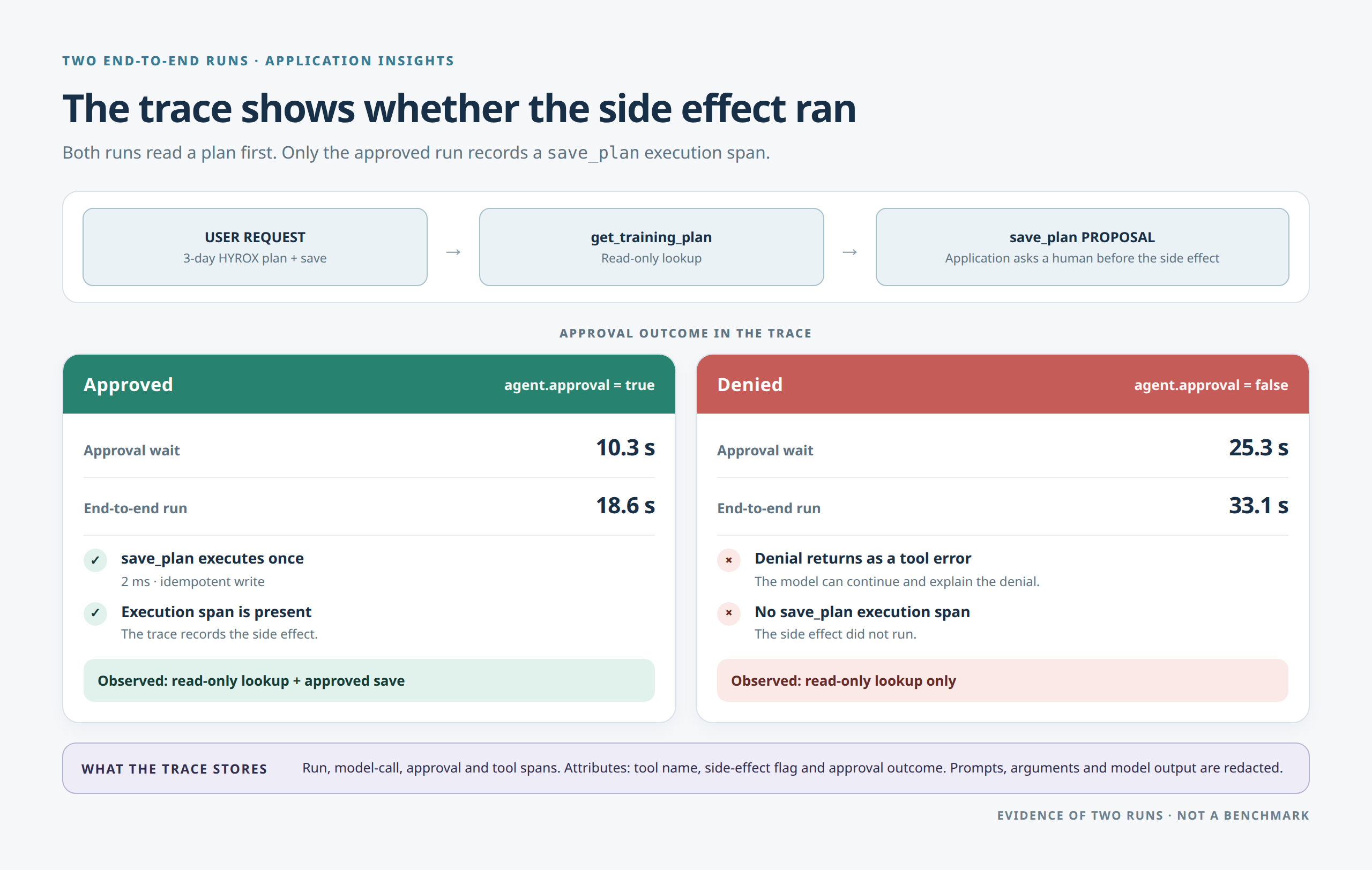
In the traced runs, the approval prompt took 10.3 s of an 18.6 s run, and 25.3 s of a 33.1 s run in which the human said no. The model calls and the tools took a few seconds. Human approval is the slowest step by design. That makes it a design problem rather than a tuning problem: it needs a timeout, a default of deny, and eventually an asynchronous path. (Two runs, so treat the ratio as illustrative.)
Both point at the same question: what, exactly, stands between a model’s proposal and an action in the real world?
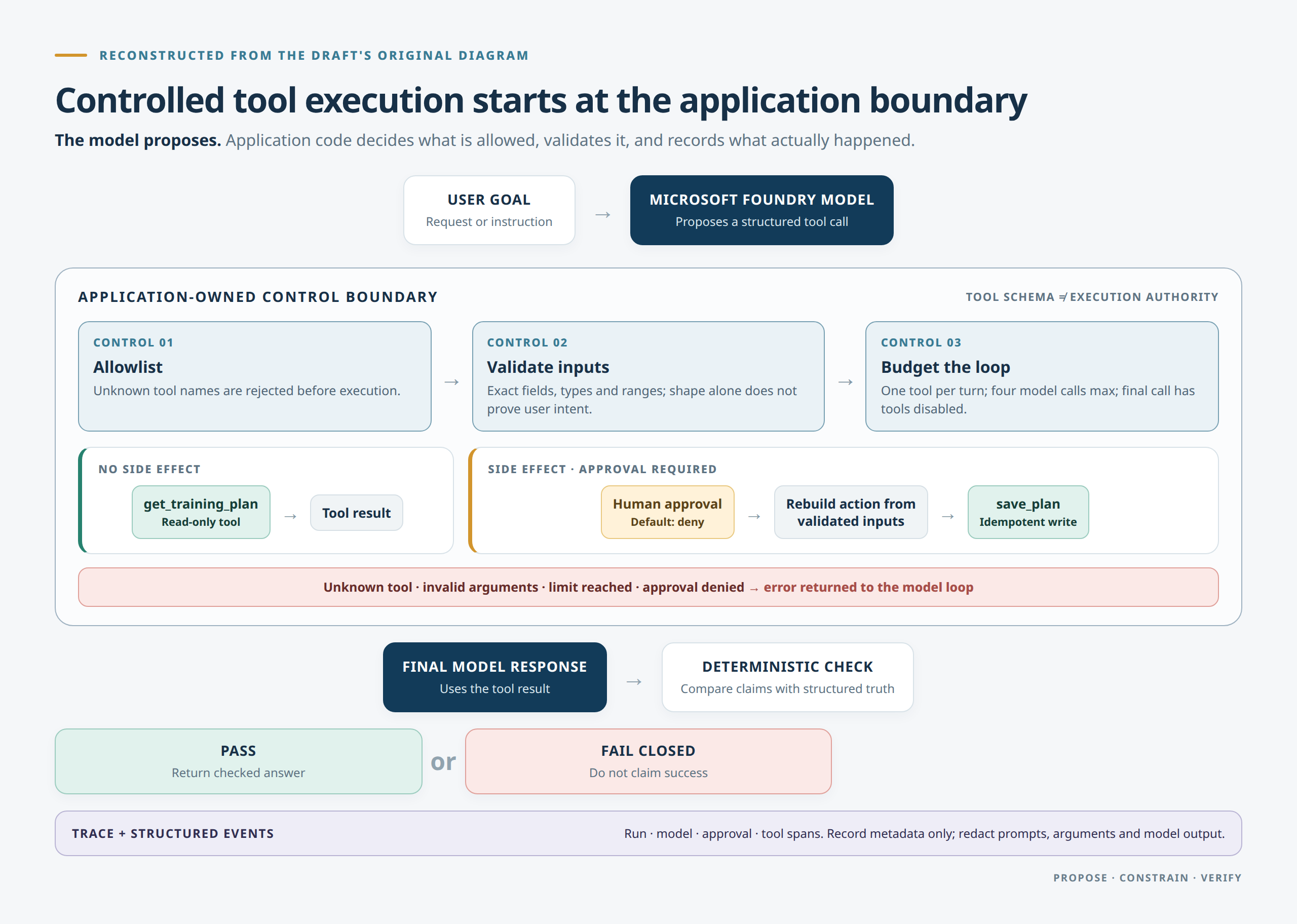
Controlled tool execution: the model may propose an action, but application code decides whether that action is allowed, valid, observable, and safe to hand back to the model.
Tested with gpt-5.4-nano on Microsoft Foundry, October 2026.
This article is about that boundary. It is deliberately narrower than "production-ready": it does not cover distributed state, incident response, privacy review, load, or business authorization. It builds one boundary and tests it.
The example
The example has two small tools. get_training_plan is read-only. save_plan has a side effect: it appends to a local file. Neither touches a real business system, which is the point. The file is the smallest side effect that still shows where the decision to allow it has to live.
The model decides whether to call a tool at all. A question such as "What does HYROX stand for?" gets a direct answer. A request for a plan calls the tool.
The model does not receive authority merely because it produced syntactically valid JSON. Rendered diagram and editable source.

Six controls
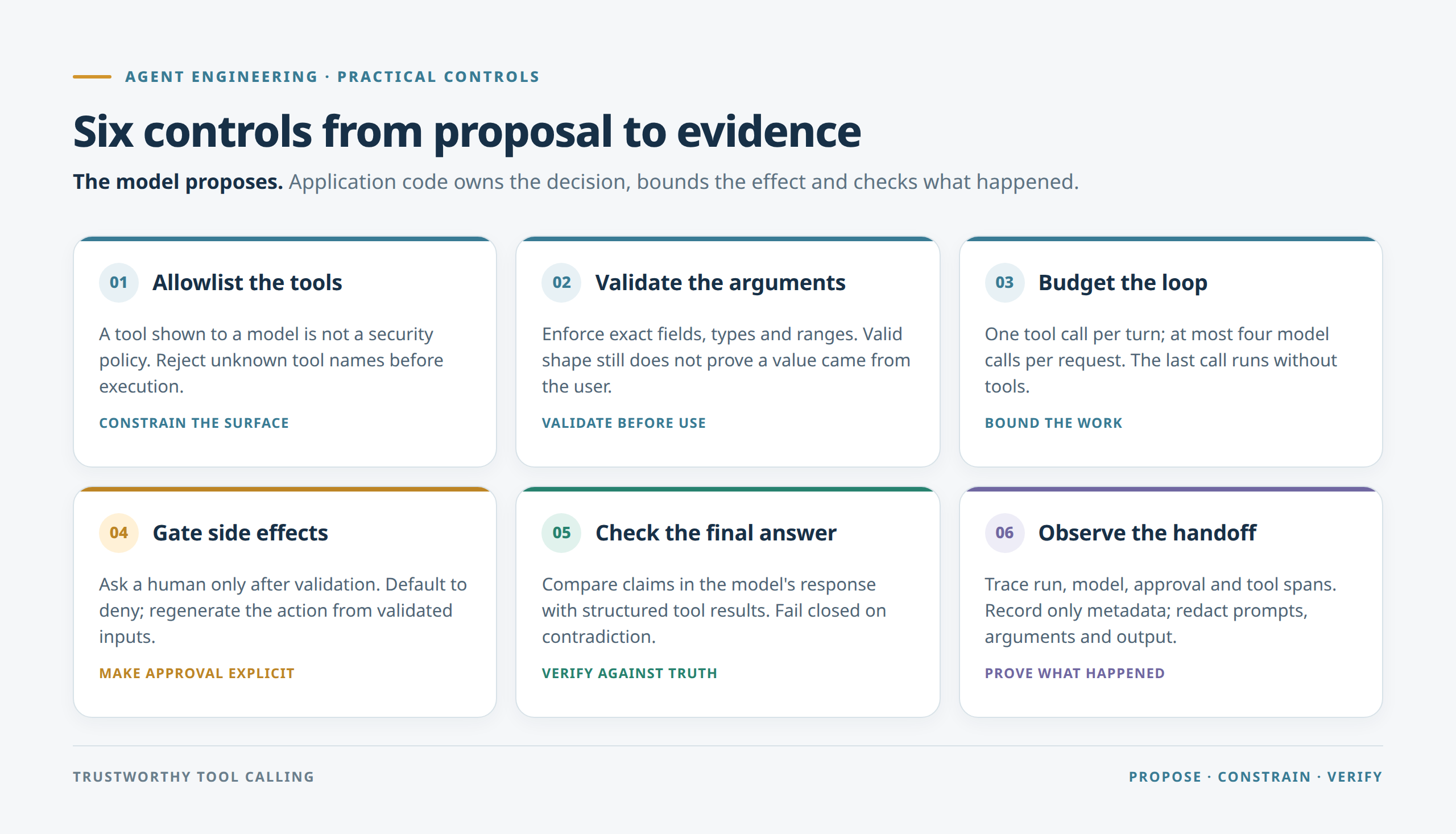
In short: allowlist, validate, budget, approve, check the answer, trace.
1. Allowlist the tool surface.
Tool definitions are instructions to a model, not a security policy. Every call passes an application-owned check, even when the model was given the same tool in its prompt. Unknown tools are rejected before execution, and the rejection goes back to the model as an error result, so the loop continues instead of crashing.
2. Validate the arguments.
Arguments must be a JSON object with exactly goal and days_available. Malformed JSON, extra keys and missing keys are rejected, and days_available must be an integer from 1 to 7. Booleans and numeric strings fail. Rejected calls never reach the tool. But validation checks shape and range. It cannot prove that a value came from the user. That is the lesson of athlete: "Unknown", and it changed the design (see below).
3. Budget the loop.
One tool call per turn, at most four model calls per request, and the last call runs with tools disabled so the loop always ends in an answer. Extra calls in a turn are skipped with an error. Tool execution is a metered operation, not an unlimited side effect of generation.
4. Require a human decision for side effects.
save_plan does not run on the model’s say-so. The application asks a person, and the default answer is no: without an interactive terminal, approval is denied. Three details matter more than the prompt itself. Validation happens before approval, so a human is never asked to approve a call that would have been rejected anyway. The model does not author what is stored: the application regenerates the plan from the validated arguments. And a denial is a result, not a crash. It goes back to the model as an error, and in the live run the model told the user it could not save without approval. Saving is also idempotent, so approving the same plan twice writes it once.
5. Check the final answer against structured truth.
After a tool has run successfully, the model can still describe a different result. The example scans schedule claims in the final prose and fails the run on a contradiction, for instance a "5-day plan" after the tool returned 4 days. It is a deterministic postcondition for one invariant, not a quality evaluation, but the pattern carries over: an account the tool marked ineligible must not be described as eligible, and a pending approval must not be described as done.
6. Make the handoff observable.
The loop emits structured events and, with tracing on, OpenTelemetry spans: one for the run, one per model call, one for the approval decision, and one per tool execution. Prompts, arguments and model output are redacted by default. The spans carry only the tool name, the side-effect flag and the approval outcome. A trace separates four facts: what the model proposed, what the application allowed and executed, what the model said afterwards, and whether the postcondition passed.
What the live runs found
The unit tests passed throughout. Running against a real model found five problems, and each changed the code:
- The model invented an argument. The forced tool call produced
athlete: "Unknown". The fix: removeathlete, makedays_availablerequired with no default, tell the model to ask when the user gives no number of days, and add a live scenario that gives no days and asserts that no tool runs. - The fix over-corrected. Told never to guess, the model asked the user to confirm "3 day a week" instead of using it. The prompt now says to use a stated number directly and ask only when none is given.
- My own evaluator passed when nothing was tested. The "side effect denied" scenario passed when the model never attempted the save. It now fails as inconclusive unless a denial actually happened.
- Repeated approved saves wrote duplicate records. Hence the idempotent write.
- Azure Monitor traces arrived incomplete. More on that below.
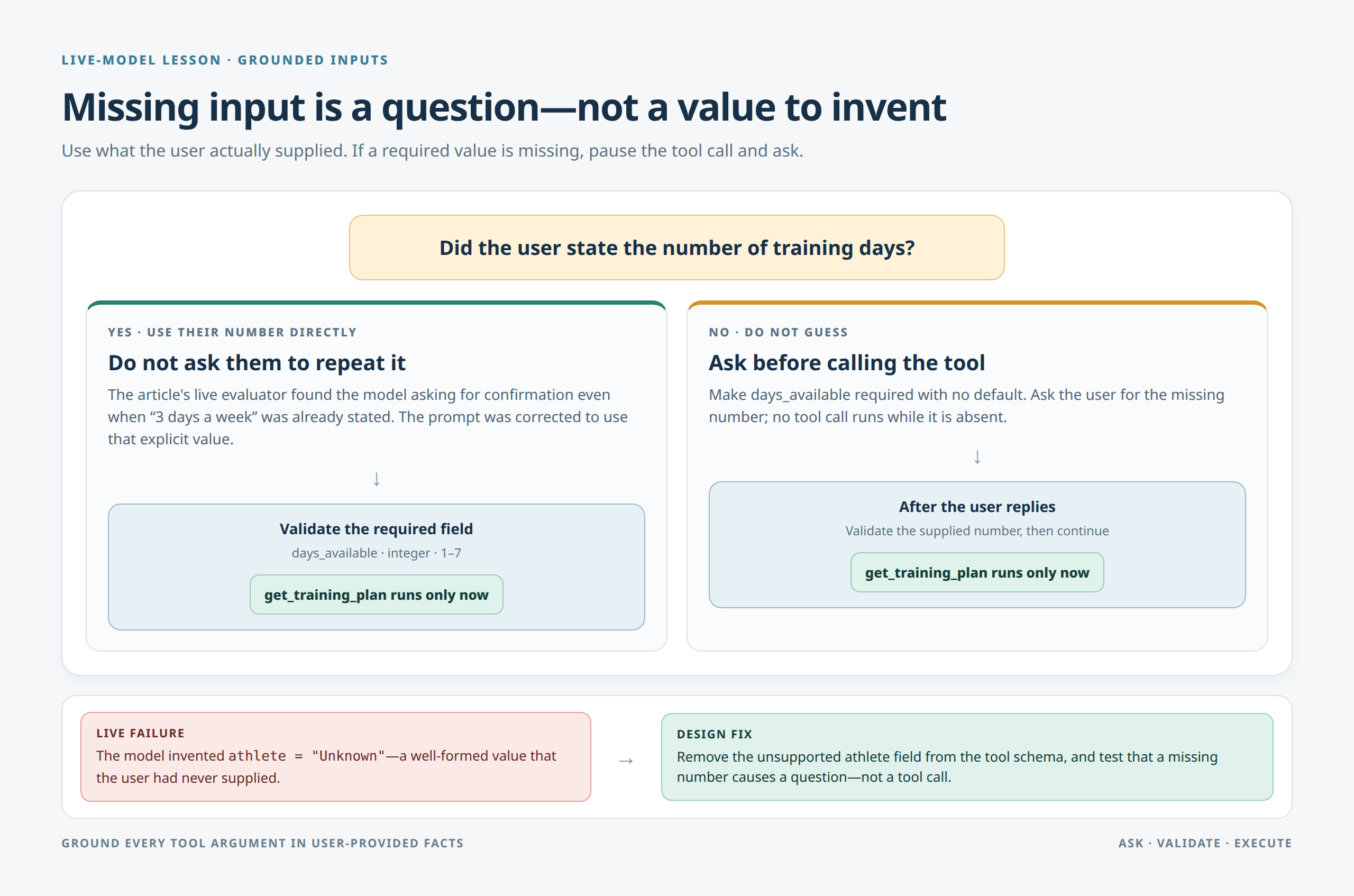
A prompt is a mitigation for the first problem, not a guarantee. The live evaluator checks whether missing inputs trigger clarification, but it does not establish where every argument came from. For consequential actions, a stronger design binds trusted input fields to application state rather than relying on the model to reproduce them faithfully.
What the trace showed
On 4 October the same example was traced end to end into Application Insights with Entra authentication. Two runs of "Create a 3 day a week HYROX plan and save it", one approved and one denied:
| Run | Total | Model calls | Human approval wait | Tool spans |
| Approved | 18.6 s | 3 (3.5 s, 1.2 s, 3.5 s) | 10.3 s | get_training_plan (0 ms), save_plan (2 ms) |
| Denied | 33.1 s | 3 | 25.3 s | get_training_plan only |
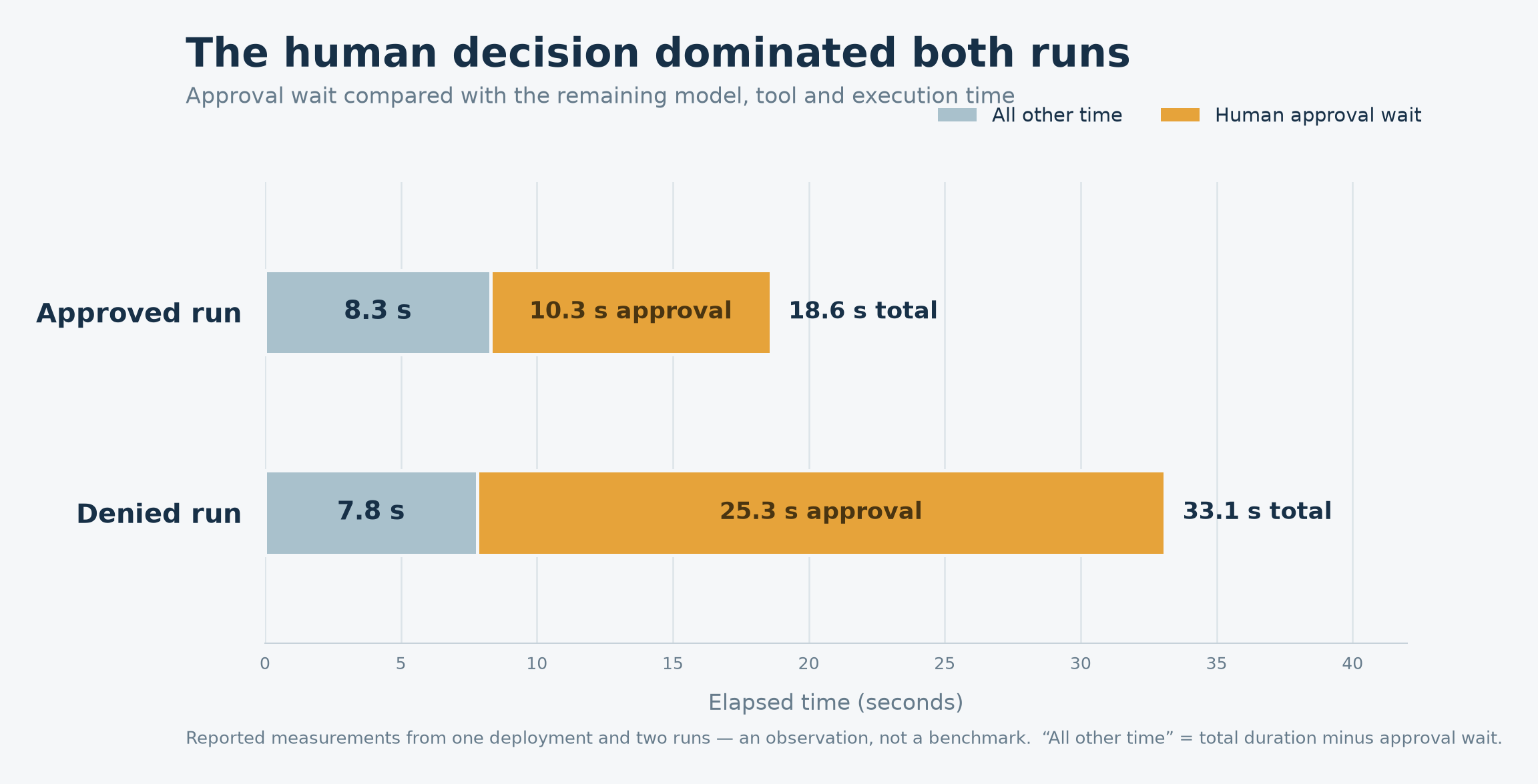
- In these two runs, the human decision dominated latency. About 55% of the approved run and 76% of the denied run was the approval wait.
- A denial is visible as an absence. The denied run has an
agent.approvalspan withagent.approvedfalse and nosave_planexecution span. The trace shows that the control worked, not just that the code ran. - Only metadata is recorded. The custom attributes were the tool name, the side-effect flag and the approval outcome. No prompt, argument or model output appeared in any span.
Two things from getting there are worth knowing before you trust a trace:
- "Configured" is not "delivered." The exporter initialized, but every batch was refused (HTTP 403) until the identity was given the Monitoring Metrics Publisher role on the Application Insights resource. The
observability_configuredevent proves initialization only. - Traces arrived incomplete under default settings. The Azure Monitor Python distro defaults to a rate-limited sampler (5 traces per second). My traces had missing spans and
itemCountvalues of 2 to 4, so I could not treat them as a complete record. I have not isolated the cause. The example now keeps every span (sampling_ratio=1.0, overridable). At production volume you would sample on purpose, and a sampled trace is not a complete record.
These figures come from one environment, one deployment and two runs: an observation, not a benchmark.
What was verified, and what was not
Verified. Three consecutive passing runs of the live evaluator, four scenarios each (tool used for a plan, asks instead of inventing missing days, no tool for a general question, side effect denied without approval), against Microsoft Foundry with deployment gpt-5.4-nano and Entra authentication. The approval path exercised by hand: answering no wrote nothing, answering yes wrote once. Thirty unit tests and ten control checks that run without a model. One approved and one denied run traced end to end. Three runs of a non-deterministic model is a small sample: evidence that the controls behave as designed on this deployment, not a pass rate.
Not proven.
- Production readiness for other tools or domains.
- Correctness of every model answer, or that every argument came from the user.
- Who may approve an action. There is no approver identity or authorization model, and no durable audit log. The approval is a terminal prompt from whoever runs the script.
- Retries, recovery, privacy or compliance review.
- Behavior of other models, or under load.
- Complete traces under default Azure Monitor settings.
The limits are part of the claim. An article about trust should state the boundary of its own evidence.
If you take only five things
- Do not force the tool call you are trying to test.
- Validate arguments, and test what happens when the user did not provide one.
- Default to deny for side effects, and ask a human only after validation.
- Trace the decision, not just the call.
- Make your evaluator able to fail.
Run it yourself
git clone https://github.com/AmrElsehemy/agentic-engineering-lab.git
cd agentic-engineering-lab
git checkout v0.1.0

# Scripted model, no credentials: save_plan is denied, then approved
python examples/01-single-agent-tool-calling/agent.py --demo
python examples/01-single-agent-tool-calling/agent.py --demo --approve

# Unit tests and control checks
python -m unittest discover -s examples/01-single-agent-tool-calling/tests
python evaluate.py

# Live Foundry evaluation, after configuration (copy .env.example to .env)
python evaluate_live.py
The example README covers the Foundry and Azure Monitor setup. Do not commit credentials, connection strings or sensitive prompts.
The takeaway
The interesting question about an agent is not only what it can do. It is what it is allowed to do, how we know what actually happened, and what fails closed when the model is wrong. This example tests that boundary for one tool and one side effect; it does not prove a production system is safe. The next work is approver identity and audit, meaning who may approve and a record that outlasts the process, before any consequential tool is added.